Async/Await in JavaScript: Writing Cleaner Asynchronous Code
Full-stack developer with a good foundation in frontend, now specializing in backend development. Passionate about building efficient, scalable systems and continuously sharpening my problem-solving skills. Always learning, always evolving.
Callbacks solved async problems early on, but they don’t scale. Nested callbacks become hard to read and harder to debug. Promises improved composition, but heavy .then() chains still fragment control flow. async/await sits on top of promises and lets you write asynchronous code in a synchronous style without changing the underlying execution model.
Why async/await was introduced
Problem 1: Callback nesting (loss of structure)
getUser(id, (err, user) => {
  if (err) return handle(err);

  getPosts(user.id, (err, posts) => {
    if (err) return handle(err);

    getComments(posts[0].id, (err, comments) => {
      if (err) return handle(err);

      console.log(comments);
    });
  });
});
Issues:
Control flow is inverted
Error handling is duplicated
Hard to reason about execution order
Problem 2: Promise chaining still fragments logic
getUser(id)
  .then(user => getPosts(user.id))
  .then(posts => getComments(posts[0].id))
  .then(comments => console.log(comments))
  .catch(handle);
Better, but:
Data flows through nested callbacks
Harder to step through in debugging
Sequential logic is visually broken
Goal
Bring back linear, top-down flow without losing async behavior.
How async functions work
Key rules
asyncfunctions always return a promiseReturned values are automatically wrapped in
Promise.resolveThrown errors become
Promise.reject
async function example() {
  return 42;
}

example().then(console.log); // 42
Equivalent to:
function example() {
  return Promise.resolve(42);
}
Execution behavior
Important detail: async functions are not blocking. They return immediately with a promise.
async function test() {
  console.log("start");
  await Promise.resolve();
  console.log("end");
}

console.log("A");
test();
console.log("B");
Output:
A
start
B
end
Why:
awaitpauses inside the functionThe outer call continues immediately
Await keyword concept
What await actually does
Waits for a promise to settle
Pauses execution of the async function
Resumes with the resolved value
function delay(ms) {
  return new Promise(resolve => setTimeout(resolve, ms));
}

async function run() {
  console.log("wait...");
  await delay(1000);
  console.log("done");
}
Important constraints
Only valid inside
asyncfunctions (or top-level in modern modules)Does not block the event loop
Internally uses promise microtasks
Sequential vs parallel
Bad (unintentionally sequential):
await fetchUser();
await fetchPosts();
Better (parallel execution):
const [user, posts] = await Promise.all([
  fetchUser(),
  fetchPosts()
]);
This is a common performance mistake.
Error handling with async code
Using try/catch
async function loadData() {
  try {
    const user = await getUser();
    const posts = await getPosts(user.id);
    console.log(posts);
  } catch (err) {
    console.error("Failed:", err);
  }
}
This works because:
awaitthrows if the promise rejectstry/catchcatches it like synchronous code
Without try/catch
Unhandled rejection:
async function load() {
  const data = await fetchData(); // throws if rejected
}
You must either:
Wrap in
try/catchOr handle at call site:
load().catch(console.error);
Subtle failure case
try {
  const data = fetchData(); // missing await
} catch (e) {
  // won't catch rejection
}
Why:
No
await→ no throwError stays inside the promise
Comparison with promises
Promise chaining
getUser()
  .then(user => getPosts(user.id))
  .then(posts => console.log(posts))
  .catch(console.error);
Async/await equivalent
async function run() {
  try {
    const user = await getUser();
    const posts = await getPosts(user.id);
    console.log(posts);
  } catch (err) {
    console.error(err);
  }
}
Differences that matter
Readability
Async/await preserves linear flow
Easier to scan and maintain
Error handling
Promises:
.catch()chainsAsync/await:
try/catchblocks
Composition
Promises are more flexible for chaining and lazy execution
Async/await is better for imperative flows
Parallelism
Promises make concurrency explicit
Async/await can accidentally serialize work if misused
Common mistakes
1. Accidental sequential execution
await task1();
await task2();
If independent → use Promise.all
2. Forgetting await
const data = fetchData(); // returns promise, not result
3. Mixing styles inconsistently
await fetchData().then(process);
Pick one style per function.
4. Blocking mindset
await looks synchronous, but it's not:
It yields control back to the event loop
Other tasks continue executing
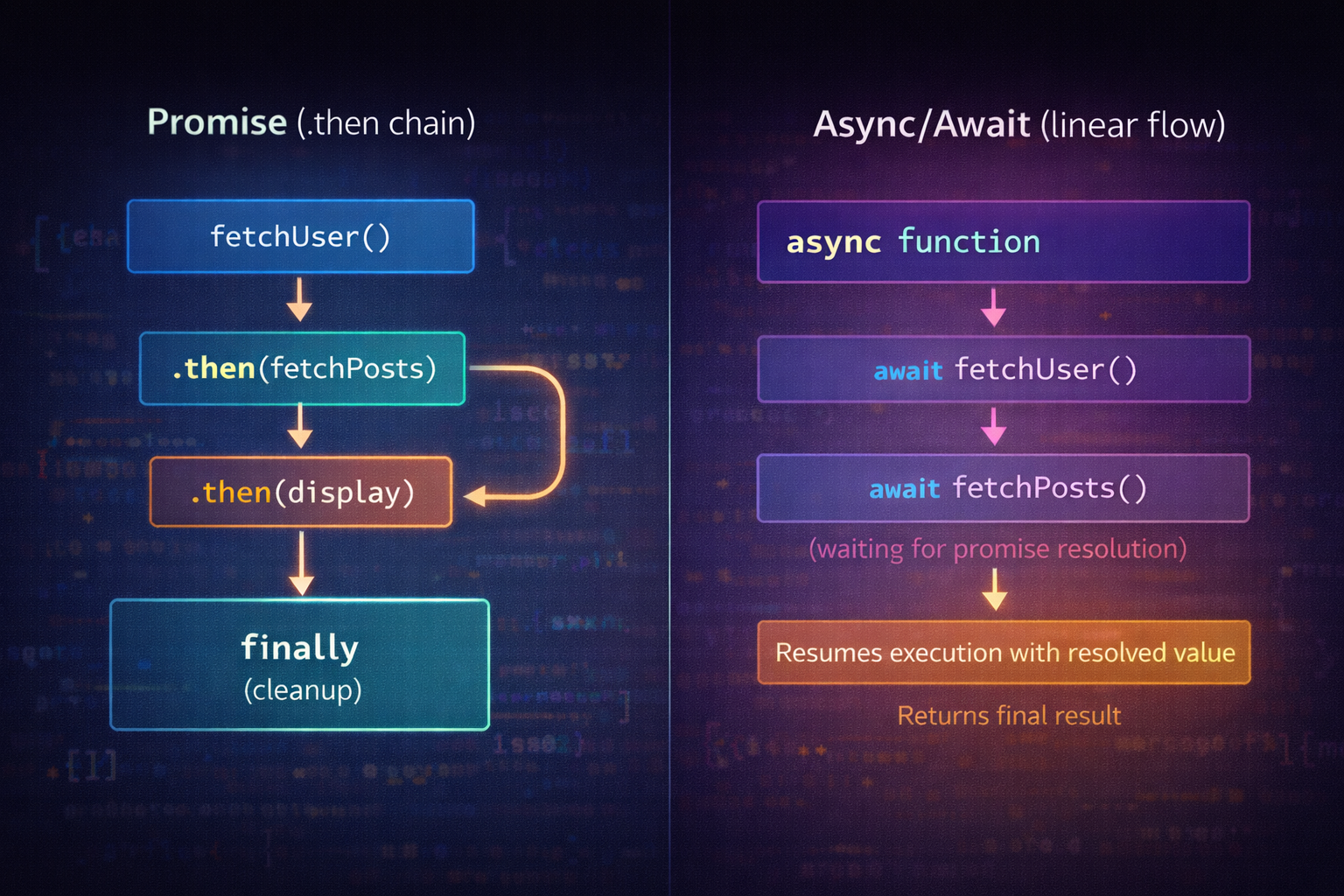
Promise vs Async/Await Flow
Promise chain: step →
.then()→.then()→.catch()Async/await: step → await → next step → try/catch
Same execution model, different readability
Async Function Execution Flow
Call async function → returns promise immediately
Hits
await→ pauses functionPromise resolves → function resumes
Final result resolves outer promise
Conclusion
async/await doesn’t replace promises—it restructures how you interact with them. Under the hood, everything is still promise-based. The real value is control flow clarity. Used correctly, it reduces cognitive load. Used carelessly, it introduces hidden performance issues like sequential waits.
Treat it as a readability tool, not a different execution model.


